Connect with Us


Imagine spending thousands on Google Ads but receiving only a handful of leads—or worse, paying for clicks that never convert.
For many businesses, the problem isn’t the budget or the product. It’s the Google Ads campaign structure.
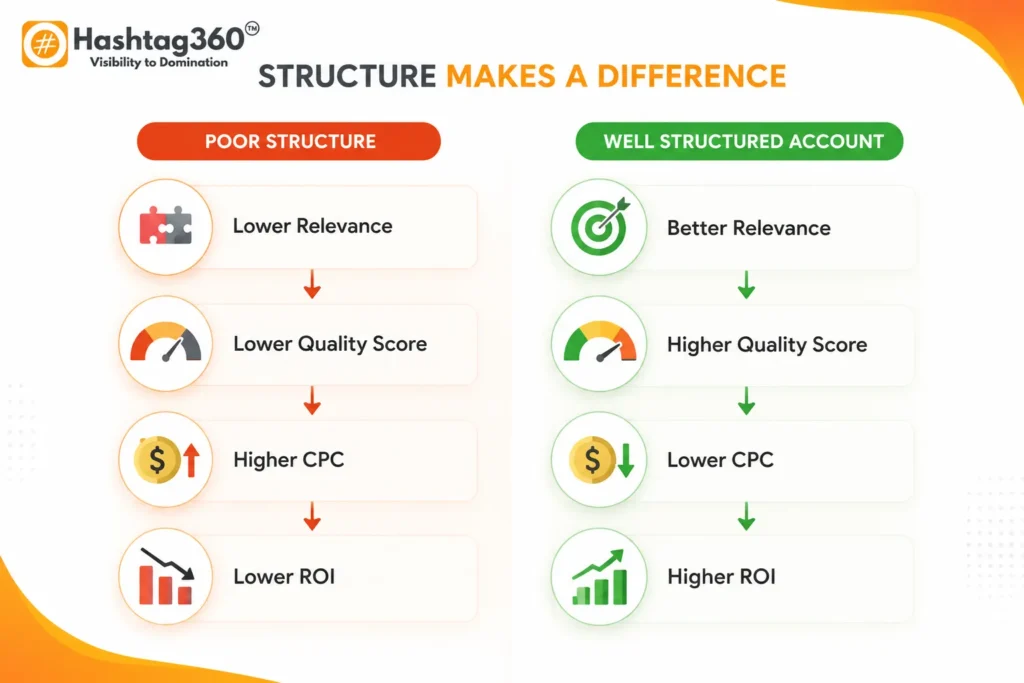
A poorly organized account makes it difficult for Google to understand your business, resulting in lower Quality Scores, higher cost-per-click (CPC), weaker ad relevance, and wasted ad spend. On the other hand, a well-structured Google Ads account enables better targeting, more relevant ads, easier optimization, and improved return on investment (ROI).
Whether you’re launching your first campaign or managing hundreds of campaigns across multiple products, understanding how Google Ads works is one of the most important skills in pay-per-click (PPC) advertising.
In this comprehensive Google ads guide, you’ll learn:
- What a Google Ads campaign structure is
- How the account hierarchy works
- The role of campaigns, ad groups, keywords, and ads
- Different campaign structure models
- How to organize campaigns for maximum performance
- Common mistakes to avoid
- Best practices used by PPC professionals
- How to create a scalable structure that grows with your business
By the end of this guide, you’ll know exactly how to build a Google Ads account that is easier to manage, more cost-effective, and optimized for long-term success.
Table of Contents
What Is Google Ads Campaign Structure?
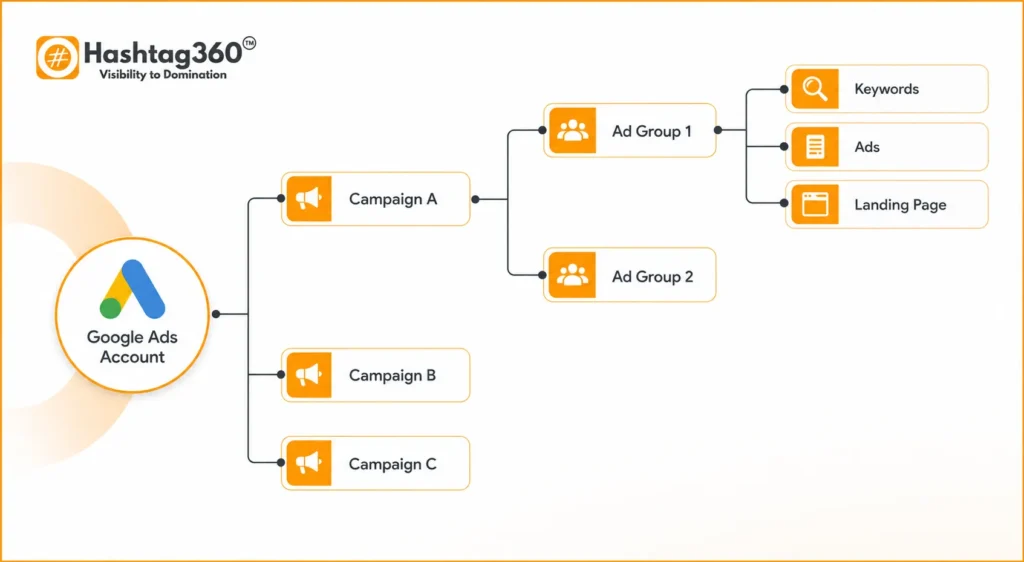
A Google Ads campaign structure is the way your Google Ads account is organized. It defines how campaigns, ad groups, keywords, ads, audiences, budgets, and landing pages are arranged to help Google serve the most relevant ads to the right users.
Think of it as the blueprint of your advertising account.
Just as a well-designed building relies on a strong architectural plan, successful Google Ads campaigns depend on a logical, organized structure.
A properly structured account makes it easier to:
- Improve ad relevance
- Increase Quality Score
- Lower CPC
- Increase Click-Through Rate (CTR)
- Improve conversion rate
- Simplify optimization
- Scale campaigns efficiently
Without a structured hierarchy, even large advertising budgets can be wasted due to overlapping keywords, poor targeting, and irrelevant ads.
Featured Snippet Answer
What is a Google Ads campaign structure?
A Google Ads campaign structure is the hierarchical organization of an advertising account, consisting of the account, campaigns, ad groups, keywords, ads, assets, and landing pages. A well-planned structure improves targeting, Quality Score, ad relevance, campaign management, and overall advertising performance.
Why Google Ads Campaign Structure Matters
One of the biggest reasons Google Ads campaigns fail isn’t poor ad copy or insufficient budget—it’s poor organization.
Google’s advertising system evaluates how closely your keywords, ads, and landing pages align. A clear account structure helps maintain this alignment, leading to better performance across nearly every metric.
Benefits of a Well-Structured Account
| Benefit | Why It Matters |
|---|---|
| Better Quality Score | Google rewards highly relevant ads with lower CPCs. |
| Lower Cost Per Click | Improved Quality Score can reduce advertising costs. |
| Higher Click-Through Rate | Relevant ads attract more clicks. |
| Better Conversion Rate | Users land on pages closely matched to their search intent. |
| Easier Optimization | Organized campaigns make performance analysis simpler. |
| Accurate Reporting | Data is segmented clearly by campaign and ad group. |
| Better Budget Control | Allocate spending by product, service, or location. |
| Easier Scaling | Add campaigns without disrupting existing ones. |
Real-World Example
Imagine a digital marketing agency offering:
- SEO
- Google Ads Management
- Social Media Marketing
- Website Design
Poor Structure
One campaign
One ad group
100 keywords
20 ads
Every service points to the homepage.
Result:
- Low relevance
- Low Quality Score
- Higher CPC
- Poor conversion rates
Good Structure
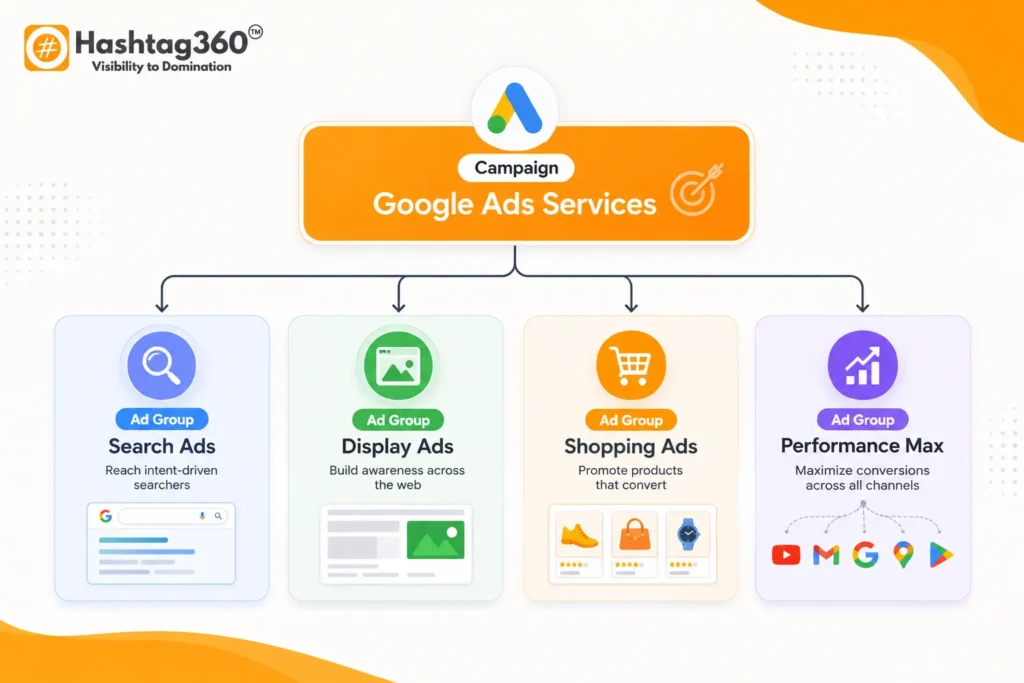
Campaign: SEO Services
- Ad Group: Local SEO
- Ad Group: Technical SEO
- Ad Group: E-commerce SEO
Campaign: Google Ads
- Ad Group: Search Ads
- Ad Group: Shopping Ads
- Ad Group: Performance Max
Campaign: Website Design
- Ad Group: WordPress
- Ad Group: E-commerce
- Ad Group: Business Websites
Each ad group has:
- Highly relevant keywords
- Customized ads
- Dedicated landing pages
Result:
- Higher ad relevance
- Better user experience
- Lower CPC
- Increased conversions
Understanding the Google Ads Hierarchy
One of the first concepts every advertiser should master is the Google Ads hierarchy. Each level has a distinct purpose, and together they create a logical framework for organizing advertising campaigns.
The hierarchy flows from broad strategic decisions to highly specific user experiences.
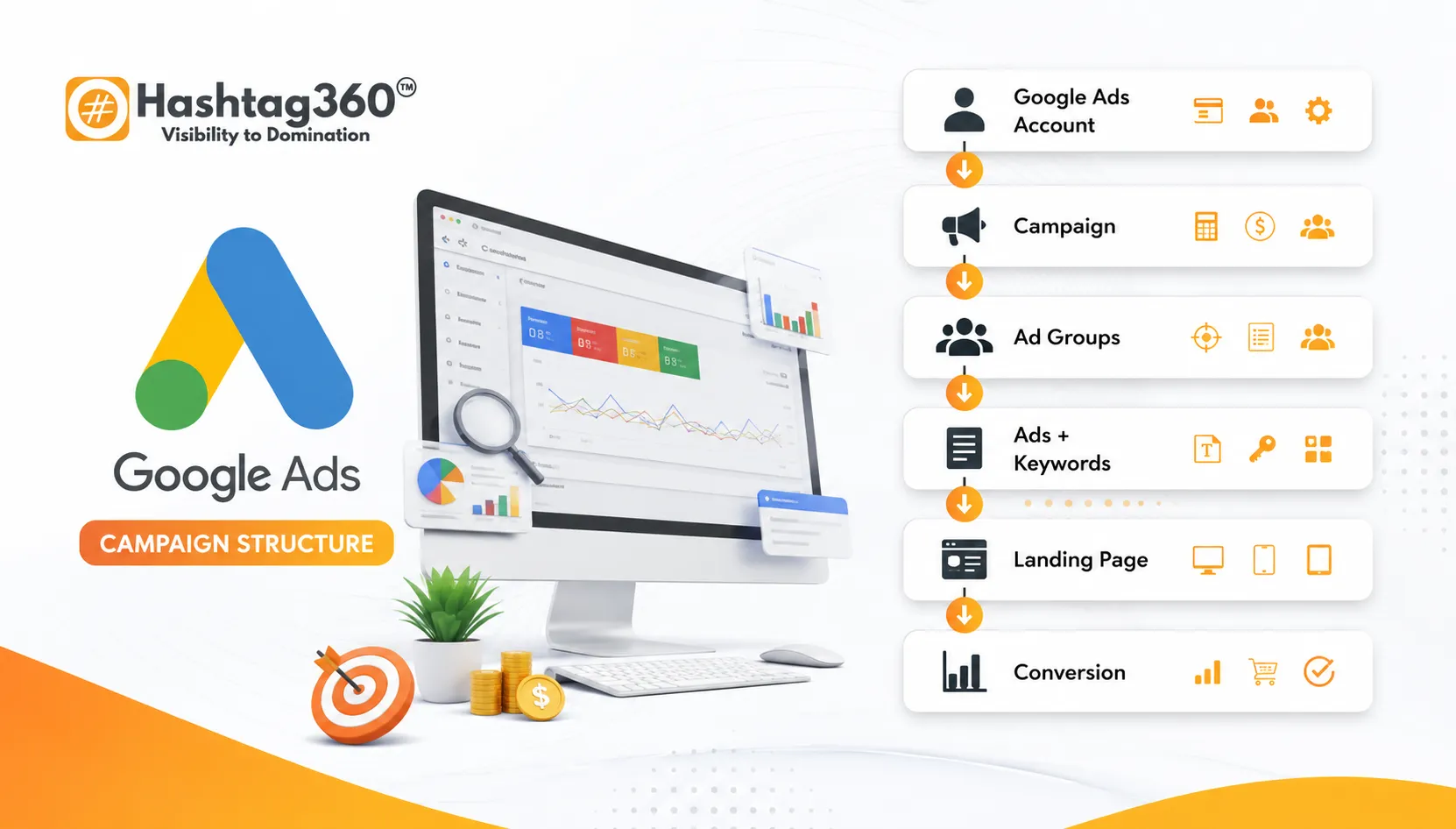
Google Ads Account
        ↓
Campaign
        ↓
Ad Group
        ↓
Keywords
        ↓
Ads
        ↓
Landing Page
        ↓
Conversion
Each level inherits settings from the level above while introducing its own configuration options. Understanding these relationships is essential for building campaigns that are both manageable and effective.
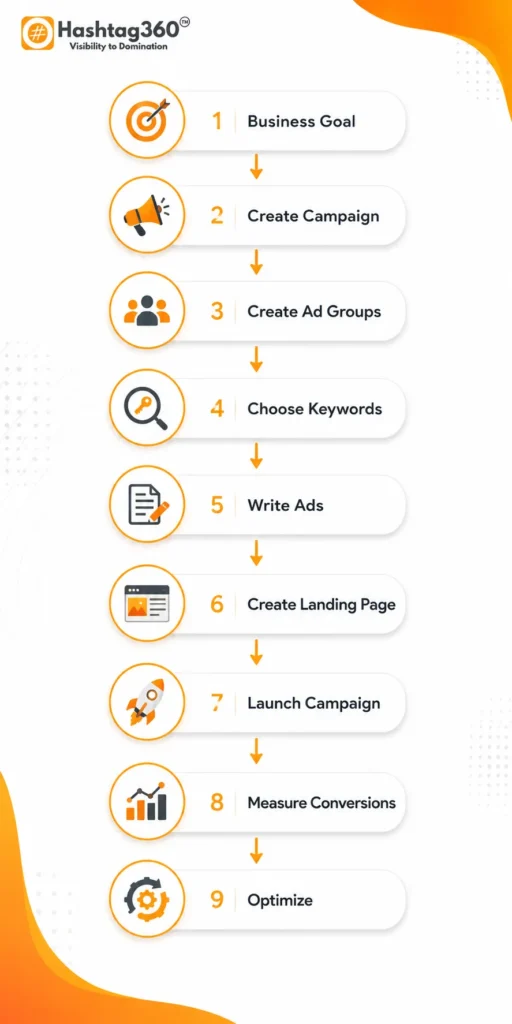
Google Ads Account Level Explained
Your Google Ads account is the highest level of the hierarchy. It acts as the central hub where all campaigns, billing information, users, conversion tracking, linked accounts, and reporting are managed.
Think of the account as the foundation of your advertising ecosystem.
A business typically needs one Google Ads account per legal entity or brand, although agencies often manage multiple client accounts through a manager account (MCC).
What Is Managed at the Account Level?
| Setting | Purpose |
|---|---|
| Billing | Payment methods and invoices |
| User Access | Team roles and permissions |
| Conversion Tracking | Website calls, forms, purchases, leads |
| Linked Accounts | Google Analytics, Merchant Center, YouTube, Search Console |
| Account Security | Access control and verification |
| Account Notifications | Billing alerts and policy updates |
Best Practices
- Maintain one account per business brand.
- Link Google Analytics and Google Search Console.
- Set up conversion tracking before launching campaigns.
- Enable auto-tagging for accurate reporting.
- Use consistent naming conventions from the start.
Key Point: A strong account setup ensures reliable data collection, accurate attribution, and smoother campaign management as your advertising grows
Campaign Level Explained
A campaign is the highest level of organization inside your Google Ads account. Every campaign contains one or more ad groups and controls the broad settings that determine how, where, when, and to whom your ads are shown.
Think of a campaign as the strategic container for a specific business objective. Instead of grouping everything into one campaign, create separate campaigns based on goals, products, services, locations, or audiences. This gives you greater control over budgets, targeting, reporting, and optimization.
What Can You Control at the Campaign Level?
| Setting | Description | Example |
|---|---|---|
| Campaign Type | Defines where ads appear | Search, Display, Shopping, Video, Demand Gen, Performance Max |
| Daily Budget | Maximum daily spend | ₹2,000/day |
| Bidding Strategy | How Google bids | Maximize Conversions, Target CPA, Manual CPC |
| Geographic Targeting | Target specific locations | India, Delhi, Mumbai |
| Language | User language preferences | English, Hindi |
| Networks | Google Search, Search Partners, Display Network | Search only |
| Devices | Desktop, Mobile, Tablet | Mobile priority |
| Schedule | Days and hours ads run | Monday–Friday, 9 AM–6 PM |
| Audience Signals | Demographics, interests, remarketing | Business owners |
Key Insight: Keep campaign-level settings consistent. If different products require different budgets, bidding strategies, or targeting, they should usually be placed in separate campaigns.
Example: Campaign Structure for a Digital Marketing Agency
| Campaign | Goal | Budget |
|---|---|---|
| SEO Services | Lead Generation | ₹2,000/day |
| Google Ads Management | Lead Generation | ₹3,000/day |
| Website Design | Lead Generation | ₹1,500/day |
| Social Media Marketing | Lead Generation | ₹1,200/day |
Each campaign can have its own targeting, budget, and performance reports.
Best Practices
- Separate campaigns by business objective.
- Avoid mixing unrelated products in one campaign.
- Use clear naming conventions (e.g.,
Search | India | SEO Services). - Allocate budgets based on profitability, not equally.
- Review campaign performance weekly.
Ad Groups Explained
If campaigns define your advertising strategy, ad groups define relevance.
An ad group contains closely related keywords and the ads triggered by those keywords. Every keyword in an ad group should share the same search intent, allowing you to write highly relevant ads that improve click-through rate (CTR) and Quality Score.
Why Ad Groups Matter
Google evaluates the relationship between:
- User search query
- Keyword
- Ad copy
- Landing page
The more closely these elements align, the more likely your ad is to perform well.
Example: Website Design Campaign
Campaign: Website Design Services
| Ad Group | Keywords | Landing Page |
|---|---|---|
| WordPress Website Design | wordpress website design, wordpress developer | /wordpress-design |
| Ecommerce Website Design | ecommerce website design, online store development | /ecommerce-websites |
| Business Website Design | business website design, company website | /business-websites |
Notice how each ad group targets a specific topic and directs users to the most relevant landing page.
Poor vs. Good Ad Group Structure
| Poor Structure | Well-Structured |
|---|---|
| One ad group with 100+ keywords | Multiple tightly themed ad groups |
| Generic ads | Highly relevant ads |
| Homepage for all clicks | Dedicated landing pages |
| Lower CTR | Higher CTR |
| Lower Quality Score | Higher Quality Score |
Best Practices
- Keep ad groups tightly themed.
- Limit each ad group to a manageable set of closely related keywords (quality over quantity).
- Match ad headlines to keyword intent.
- Send traffic to the most relevant landing page.
Keywords and Match Types
Keywords connect your ads with user searches. Choosing the right keywords—and the right match types—is essential for reaching the right audience while controlling costs.
Types of Keywords
- Branded keywords
- Non-branded keywords
- Commercial keywords
- Transactional keywords
- Informational keywords
- Local keywords
- Competitor keywords (where allowed and appropriate)
Keyword Match Types
| Match Type | Symbol | Reach | Example |
|---|---|---|---|
| Broad Match | None | Widest | google ads services |
| Phrase Match | ” “ | Medium | “google ads services” |
| Exact Match | [ ] | Most Precise | [google ads services] |
Tip: Start with phrase and exact match for better control, then expand if performance data supports it.
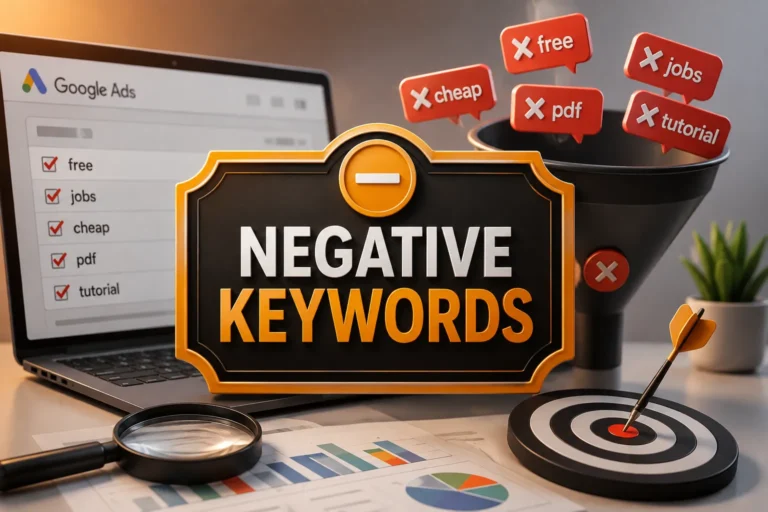
Negative Keywords
Negative keywords prevent your ads from showing for irrelevant searches.
Example
You’re selling premium marketing services.
Negative Keywords
- Free
- Jobs
- Salary
- Course
- Internship
This helps reduce wasted ad spend and improves campaign efficiency.
Keyword Organization Checklist
- Group keywords by intent.
- Avoid duplicate keywords across ad groups.
- Include negative keywords.
- Match keyword intent with ad copy.
- Send traffic to relevant landing pages.
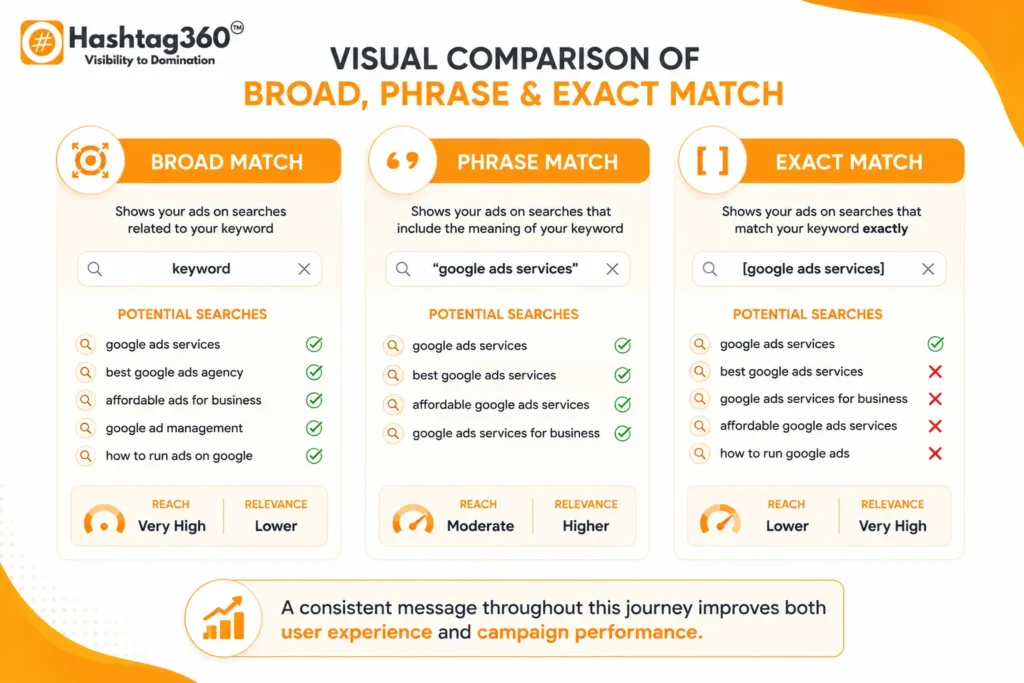
Recommended Alt Text: Comparison of Google Ads keyword match types: Broad, Phrase, and Exact.
Ads and Assets
Keywords trigger your ads—but compelling ad copy earns the click.
Google Search Ads typically include:
- Headlines
- Descriptions
- Display URL
- Final URL
- Assets (formerly extensions)
Responsive Search Ads (RSA)
Responsive Search Ads allow Google to test different combinations of headlines and descriptions to identify the highest-performing variations.
Components
| Element | Recommended Count |
|---|---|
| Headlines | Up to 15 |
| Descriptions | Up to 4 |
| Final URL | 1 |
| Display Path | Optional |
Common Ad Assets
| Asset | Purpose |
|---|---|
| Sitelink | Link to additional pages |
| Callout | Highlight benefits |
| Structured Snippet | Showcase categories |
| Call | Enable phone calls |
| Location | Display business address |
| Price | Show pricing |
| Promotion | Advertise offers |
| Image | Add visual appeal (eligible campaigns) |
Assets improve visibility and often increase CTR by providing more information directly in the search results.
Example Ad
Headline Ideas
- Google Ads Management Services
- Certified PPC Experts
- Increase ROI with Google Ads
Description
Generate more qualified leads with professionally managed Google Ads campaigns. Transparent reporting, conversion tracking, and continuous optimization.
Best Practices
- Include the primary keyword in at least one headline.
- Focus on user benefits, not just features.
- Add a clear call to action.
- Use all available headline and description slots where relevant.
- Regularly review asset performance.
Landing Pages: Where Conversions Happen
A great ad can drive clicks, but the landing page determines whether those clicks become leads or sales.
Your landing page should continue the promise made in your ad by delivering relevant, helpful, and easy-to-understand content.
Essential Landing Page Elements
| Element | Purpose |
|---|---|
| Clear Headline | Matches the ad message |
| Supporting Copy | Explains the offer |
| Benefits | Builds interest |
| Trust Signals | Reviews, certifications, testimonials |
| Strong CTA | Encourages action |
| Contact Form | Captures leads |
| Fast Loading | Improves user experience |
| Mobile Optimization | Supports mobile users |
Landing Page Checklist
- Headline matches keyword intent.
- Ad message matches page content.
- CTA is prominent.
- Mobile-friendly layout.
- Fast loading speed.
- Minimal distractions.
- Relevant visuals.
- Social proof included.
Example User Journey
🔍Search Query
↓
🔑Keyword
↓
📢Google Ad
↓
🌐Landing Page
↓
📝Lead Form
↓
✅Thank You Page
↓
📈Conversion Tracking
A consistent message throughout this journey improves both user experience and campaign performance.
Putting It All Together: Sample Campaign Structures
Example 1: Local Plumbing Business
| Campaign | Ad Groups |
|---|---|
| Emergency Plumbing | Burst Pipes, Water Leaks, 24/7 Service |
| Drain Cleaning | Kitchen Drains, Bathroom Drains |
| Water Heater Repair | Repair, Installation |
Example 2: E-commerce Store
| Campaign | Ad Groups |
|---|---|
| Running Shoes | Men’s Running Shoes, Women’s Running Shoes |
| Hiking Boots | Waterproof Boots, Trekking Boots |
| Accessories | Socks, Insoles, Shoe Care |
Example 3: SaaS Company
| Campaign | Ad Groups |
|---|---|
| CRM Software | Small Business CRM, Enterprise CRM |
| Project Management | Team Collaboration, Task Management |
| Free Trial | Trial Signup, Demo Request |
Example 4: Digital Marketing Agency
| Campaign | Ad Groups |
|---|---|
| SEO Services | Local SEO, Technical SEO, Ecommerce SEO |
| Google Ads | Search Ads, Shopping Ads, Performance Max |
| Website Design | WordPress, Ecommerce, Corporate Websites |
| Social Media Marketing | Facebook Ads, Instagram Ads, LinkedIn Marketing |
Choosing the Right Google Ads Campaign Structure
There isn’t a single “perfect” campaign structure. The best approach depends on your business model, goals, product catalog, budget, and audience. Understanding the most common structure models will help you select one that aligns with your advertising strategy.
Service-Based Business Structure
This model is ideal for agencies, consultants, law firms, healthcare providers, and local service businesses.
Example
Google Ads Account
│
├── SEO Services
│   ├── Local SEO
│   ├── Technical SEO
│   └── Ecommerce SEO
│
├── Google Ads Management
│   ├── Search Ads
│   ├── Shopping Ads
│   └── Performance Max
│
└── Website Design
    ├── WordPress
    ├── Ecommerce
    └── Corporate Websites
Best For:
- Digital agencies
- Lawyers
- Doctors
- Accountants
- Home services
E-commerce Structure
For online stores, organize campaigns by product categories and ad groups by product types or brands.
Example
Campaign: Shoes
├── Running Shoes
├── Casual Shoes
└── Sports Shoes

Campaign: Clothing
├── T-Shirts
├── Hoodies
└── Jackets
Benefits:
- Easier inventory management
- Better Shopping campaign optimization
- Clear reporting by category
Location-Based Structure
Businesses serving multiple cities or regions should separate campaigns by geography.
Example:
- Delhi
- Mumbai
- Bengaluru
- Hyderabad
This allows:
- Location-specific budgets
- Local messaging
- Better geo-performance reporting
Brand vs Non-Brand Campaigns
Never mix branded and non-branded keywords.
Example:
Brand Campaign
- Hashtag360
- Hashtag360 Google Ads
- Hashtag360 PPC Agency
Non-Brand Campaign
- Google Ads Agency
- PPC Management Services
- Google Ads Experts
Why?
Branded keywords usually have:
- Higher CTR
- Lower CPC
- Higher conversion rates
Separating them provides cleaner reporting and budget control.
Campaign Naming Convention
A standardized naming convention makes account management easier, especially as the number of campaigns grows.
Recommended Format
Campaign Type | Location | Service | GoalExamples
- Search | India | SEO | Leads
- Search | Delhi | Google Ads | Leads
- Performance Max | India | Ecommerce | Sales
- Display | Remarketing | All Products
Benefits
- Easier reporting
- Faster optimization
- Better team collaboration
Common Mistakes to Avoid
Many businesses struggle with Google Ads because of avoidable structural issues.
Mistake 1: One Campaign for Everything
Combining all products or services into a single campaign limits budget control and reduces relevance.
Better Approach: Create separate campaigns for distinct offerings.
Mistake 2: Too Many Keywords in One Ad Group
Mixing unrelated keywords forces generic ad copy.
Better Approach: Keep ad groups tightly themed around a single intent.
Mistake 3: Sending All Traffic to the Homepage
Users searching for a specific service expect a page dedicated to that service.
Better Approach: Match each ad group with a relevant landing page.
Mistake 4: Ignoring Negative Keywords
Without negative keywords, your ads may appear for irrelevant searches, wasting budget.
Better Approach: Maintain and update a negative keyword list regularly.
Mistake 5: No Conversion Tracking
Clicks alone don’t indicate success.
Better Approach: Track form submissions, phone calls, purchases, and other meaningful actions.
Mistake 6: Inconsistent Naming
Poor naming conventions make reporting and optimization difficult.
Better Approach: Use a consistent naming format across all campaigns and ad groups.
Google Ads Campaign Structure Best Practices
Use this checklist to build scalable, high-performing campaigns.
Campaigns
- Separate campaigns by business goal.
- Allocate budgets strategically.
- Use location-specific campaigns where appropriate.
- Separate branded and non-branded traffic.
Ad Groups
- Group keywords by intent.
- Keep ad groups focused.
- Avoid unrelated keywords.
Keywords
- Conduct thorough keyword research.
- Use phrase and exact match where appropriate.
- Add negative keywords.
- Review search terms regularly.
Ads
- Include primary keywords naturally.
- Highlight benefits and value propositions.
- Test multiple headlines and descriptions.
- Add relevant assets.
Landing Pages
- Align page content with keyword intent.
- Use clear CTAs.
- Optimize for mobile devices.
- Improve page speed.
Measurement
- Set up conversion tracking.
- Monitor Quality Score.
- Analyze CTR, CPC, and conversion rates.
- Optimize based on data, not assumptions.
Expert Tips for Better Campaign Structure
1. Think Like Your Customer
Organize campaigns based on how users search, not how your business is internally organized.
2. Prioritize Search Intent
Create separate ad groups for:
- Informational
- Commercial
- Transactional
- Brand-specific
This improves ad relevance and landing page alignment.
3. Don’t Over-Segment
While relevance is important, creating hundreds of tiny ad groups can make management unnecessarily complex.
Aim for a balance between specificity and maintainability.
4. Review Search Terms Frequently
Regularly analyze search term reports to:
- Discover new keyword opportunities.
- Add negative keywords.
- Refine match types.
5. Optimize Continuously
Google Ads isn’t a “set it and forget it” platform.
Successful advertisers consistently:
- Test ads.
- Adjust bids.
- Improve landing pages.
- Refine audience targeting.
- Analyze performance metrics.
Frequently Asked Questions (FAQs)
What is the ideal Google Ads campaign structure?
The ideal Google Ads campaign structure organizes campaigns by business objectives, ad groups by closely related keywords, and directs traffic to relevant landing pages. This improves Quality Score, lowers CPC, and simplifies optimization.
How many campaigns should a business have?
There is no fixed number. Create separate campaigns when products, services, locations, budgets, or goals differ significantly.
How many keywords should be in an ad group?
Rather than focusing on a specific number, prioritize tightly related keywords that share the same search intent. The key is relevance, not volume.
Should I use one landing page for all ads?
No. Each ad group should ideally direct users to a landing page that closely matches the keyword and ad message.
What is the difference between a campaign and an ad group?
A campaign controls overall settings such as budget, bidding, targeting, and schedule. An ad group organizes related keywords and ads within that campaign.
Does campaign structure affect Quality Score?
Yes. A well-organized campaign improves relevance between keywords, ads, and landing pages, which can contribute to a higher Quality Score.
How often should I review my campaign structure?
Review your account structure periodically—especially after launching new products, expanding into new markets, or observing significant performance changes.
Conclusion
A well-designed Google Ads campaign structure is the foundation of every successful PPC strategy.
By organizing campaigns thoughtfully, grouping keywords by intent, writing relevant ads, and sending users to dedicated landing pages, businesses can create campaigns that are easier to manage and more likely to achieve their marketing goals.
Remember these key principles:
- Build campaigns around business objectives.
- Keep ad groups tightly themed.
- Match keywords, ads, and landing pages.
- Use negative keywords to reduce wasted spend.
- Measure performance with conversion tracking.
- Continuously optimize based on real data.
Google Ads success isn’t determined by budget alone—it’s driven by relevance, organization, and ongoing improvement.
Call to Action
Need help creating a high-performing Google Ads account structure?
Our PPC specialists can audit your existing campaigns, identify opportunities to improve Quality Score and ROI, and build a scalable campaign structure tailored to your business goals.
Contact us today to start optimizing your Google Ads performance.